No se porque Google no ha promocionado mucho esta función de +1
Aún no se sabe con seguridad con que otros servicios se va a integrar (aparte de Google Profiles) pero Google se está viendo muy lento.
Mostrando las entradas con la etiqueta Google. Mostrar todas las entradas
Mostrando las entradas con la etiqueta Google. Mostrar todas las entradas
Plus 1 Button
Restore Contacts
Esta nueva función en la lista de contactos es muy útil, porque en muchísimas ocasiones eliminamos contactos por error o con con toda la intención de hacerlo, pero después se puede necesitar la info de algún contacto eliminado y Restore contacts es la solución a ese problema.
in reference to: Restore contacts - Gmail Help (view on Google Sidewiki)Google Me
Me gustó mucho este post porque es muy cierto, Google debe apurarse en lanzar Google Me, porque cada dia que pasa Facebook se vuelve mas fuerte hasta llegar al punto de ser virtualmente Invencible.
in reference to:"No one really knows except Google! But it should launch before the end of 2010 or in the beginning of 2011 because if they do not launch "Google Me" between this period facebook will be unstopable."
- Google me Release date (view on Google Sidewiki)
Gizmo = The New Google Talk?
Es muy probable (casi seguro) que ahora que Gizmo es parte de Google este se convierta en el Google Talk 2.0, o bien podría desaparecer Gtalk y quedar únicamente Gizmo, claro que con algunas mejoras e integración a las cuentas de Google.
El tiempo dirá lo que Google tiene planeado para Gizmo que según mi pronostico se sabrá para el primer trimestre de este año 2010.
in reference to: Gizmo5 Has Been Acquired by Google (view on Google Sidewiki)
El tiempo dirá lo que Google tiene planeado para Gizmo que según mi pronostico se sabrá para el primer trimestre de este año 2010.
in reference to: Gizmo5 Has Been Acquired by Google (view on Google Sidewiki)
A flurry of features for feed readers
A flurry of features for feed readers: "Since our last big launch, we've been thinking about ways to help our users better share, discover, and consume content in Reader. Today, I'm happy to announce several new features that we hope will further improve the way you use Reader.
Send to...
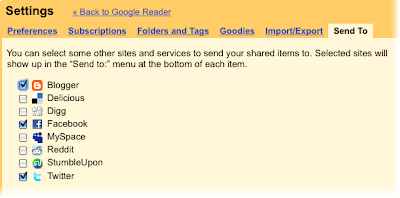
 We've made it easier to share posts you like to Blogger, Twitter, Facebook, and more, with our new 'Send to' feature. (Incidentally, Blogger is celebrating its tenth birthday this month, and we're hoping our friends there will like this little birthday present.)
Just head over to the settings page, and enable the services you want to use. If your favorite service isn't listed (and you're feeling extra geeky), you can create your own 'Send to' link with a URL template.
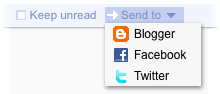
To share an item on one of your sites, simply click the 'Send to' button and choose your service. If you're into keyboard shortcuts, 'shift-t' will do the same.
Feeds from people you follow
When we added following, we tried to make it easier to find and follow people who share similar interests. Now we've gone even further, and made it possible for you to subscribe directly to the blogs, photos, or Twitter updates that anyone you're following has included on their Google profile.

To quickly subscribe to these sites, click the 'From people you follow' tab on the 'Browse for stuff' page.
More control for mark all as read
 We know people can be overwhelmed by too many unread items, and sometimes only want to see recent posts. The 'Mark all as read' button now has a menu that lets you choose to only mark items as read if they're older than your specified time frame. A tip of the hat to Nick Bradbury who pioneered this 'panic button' feature.
Finally, a few small tweaks in this release:
As always, if you have feedback, please head over to our help group, Twitter, or Get Satisfaction.


Send to...
We've made it easier to share posts you like to Blogger, Twitter, Facebook, and more, with our new 'Send to' feature. (Incidentally, Blogger is celebrating its tenth birthday this month, and we're hoping our friends there will like this little birthday present.)Just head over to the settings page, and enable the services you want to use. If your favorite service isn't listed (and you're feeling extra geeky), you can create your own 'Send to' link with a URL template.

To share an item on one of your sites, simply click the 'Send to' button and choose your service. If you're into keyboard shortcuts, 'shift-t' will do the same.
Feeds from people you follow
When we added following, we tried to make it easier to find and follow people who share similar interests. Now we've gone even further, and made it possible for you to subscribe directly to the blogs, photos, or Twitter updates that anyone you're following has included on their Google profile.
To quickly subscribe to these sites, click the 'From people you follow' tab on the 'Browse for stuff' page.
More control for mark all as read
We know people can be overwhelmed by too many unread items, and sometimes only want to see recent posts. The 'Mark all as read' button now has a menu that lets you choose to only mark items as read if they're older than your specified time frame. A tip of the hat to Nick Bradbury who pioneered this 'panic button' feature.Finally, a few small tweaks in this release:
- When you expand an item in comment view, you now get the full set of actions, enabling you to share, like, and star items without leaving comment view.
- We added a 'Feeds' start-page option for the iPhone/Android/Pre mobile interface, so you can see a list of your subscriptions when you sign in.
- There is now an option to show notes when embedding your shared items on other pages as clips.
As always, if you have feedback, please head over to our help group, Twitter, or Get Satisfaction.
Suscribirse a:
Entradas (Atom)